Read today’s chapter
Your church and groups set the reading plan. Choose an English Bible translation in the app, or open your physical Bible.
A DAILY HABIT. A SHARED FAITH.
Make a little room for the Bible.
Read with your church, share what stays with you, and encourage each other along the way.
For your church. For your groups. For your everyday.
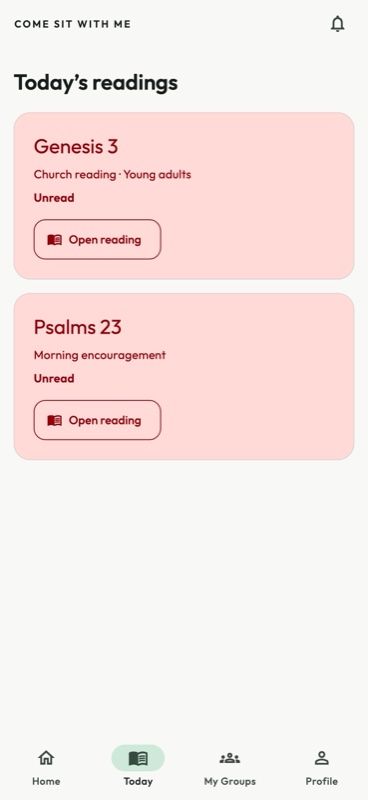
KEEP IT SIMPLE
You don’t need another complicated routine. CSWM gives your church a shared place to keep reading and keep connected.
Your church and groups set the reading plan. Choose an English Bible translation in the app, or open your physical Bible.
Save a reflection about your reading and share it with the groups you belong to. Follow the conversation and react with encouragement.
Keep track of your reading, look back at earlier chapters, and choose a gentle reminder at a time that works for you.
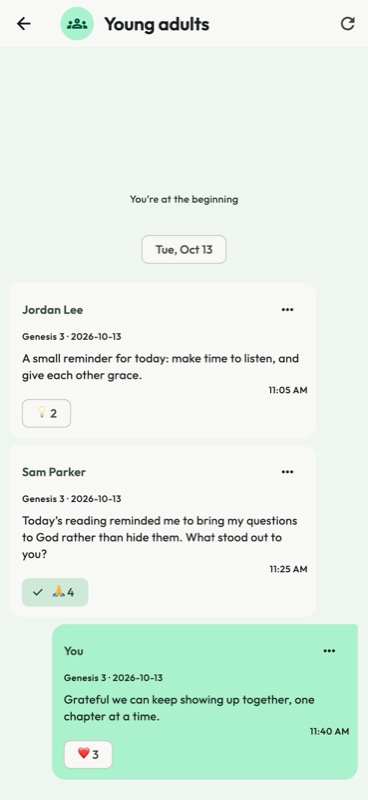
ROOM FOR REFLECTION
A familiar conversation-style view brings your group’s thoughts together. Scroll back through earlier days and find encouragement in what others have noticed.
BUILT FOR YOUR CHURCH
Bring your congregation and small groups together around the Bible. Invite members with your church code and shape the reading journey around your community.
Set up your churchSet a church-wide plan and let groups follow their own chapters when needed.
Manage membership, group participants and leaders with clear administrator permissions.
Share announcements, review reading engagement and moderate shared reflections.
Create an account, verify your email, then open Profile → My Church. Enter the four-character invitation code from your church administrator. Some churches review requests before approving membership.
Yes. Read the assigned chapter in your own Bible or another Bible app, then record your completion and reading source in CSWM.
Yes. Get started or log in from this website to open the CSWM web app. Your account, readings and church membership are shared with the iPhone app.
Shared thoughts appear only in eligible groups, or on your profile when you choose to share them there. Approved church members can view profiles, and authorised administrators can moderate community content.
An administrator can create a church, set membership preferences and configure its reading plan. Community features require active church access. If you need help getting your church ready, contact support.
COME SIT WITH ME